


0

In Windows10 Operating system the "File Explorer" is used to manage folders.
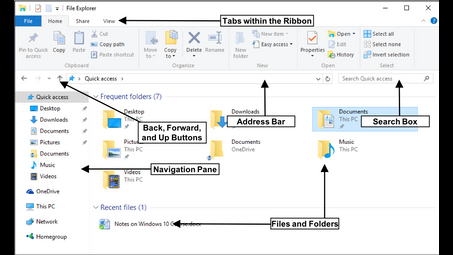

What else can I help you with?
What system creates tells the computer how to work and allows the user to manage files and folders?
The file system.
What is A program that enbles you to create and manage folders and copy move sort delete files?
A program that enables you to create and manage folders and perform file operations such as copying, moving, sorting, and deleting is typically known as a file manager. Examples of file managers include Windows File Explorer, macOS Finder, and various third-party applications like Total Commander or Midnight Commander. These programs provide a graphical interface to organize files and directories efficiently on your computer or device.
What is designed to specifically manage computer peripheral devices?
operating system
What is the collection of programs that manage and coordinate the activities taking place within a computer?
The collection of programs that manage and coordinate the activities that take place within a computer is called the Operating System.
How does computer networking manage the resources the school?
I don't even know but you can ask the principal if you want.
What system creates tells the computer how to work and allows the user to manage files and folders?
The file system.
Which software allow us to view all the files and folders which are saved in computer?
File management software, such as Windows File Explorer or macOS Finder, allows users to view all the files and folders saved on their computer. These programs provide a graphical interface for navigating the file system, organizing files, and accessing various storage locations. Additionally, command-line tools like Command Prompt or Terminal can also be used to list and manage files and directories.
What is the name of the program that enables you to create and manage folders and to copy move sort and delet files in a computer?
That's the 'file manager' program.
Can you create new folders on hotmail?
yes you can go to manage folders then press new
What is the name of the area that stores files and folders on a computer?
The area that stores files and folders on a computer is called the storage drive or hard drive. This can be a traditional hard disk drive (HDD), a solid-state drive (SSD), or other storage media like external drives. The operating system organizes files and folders within this storage space, allowing users to access and manage them effectively.
Where do Windows 7 Libraries fit into the file storage hierarchy?
Windows 7 Libraries serve as virtual folders that aggregate content from multiple physical locations on the computer, such as different folders or drives. They provide a convenient way to organize and access related files without duplicating them, as they reference the original files stored in their actual locations. Libraries typically include default categories like Documents, Music, Pictures, and Videos, allowing users to manage their media and documents more effectively within a unified view.
What type of folder can contain other folders?
A folder that can contain other folders is typically referred to as a "directory" in computing. In a file system, directories can hold both files and subdirectories, allowing for an organized hierarchy of data. This structure helps users manage files efficiently by categorizing them into various levels of folders.
How does an operating system manage files and folders?
They use a filing cabinet
What is A program that enbles you to create and manage folders and copy move sort delete files?
A program that enables you to create and manage folders and perform file operations such as copying, moving, sorting, and deleting is typically known as a file manager. Examples of file managers include Windows File Explorer, macOS Finder, and various third-party applications like Total Commander or Midnight Commander. These programs provide a graphical interface to organize files and directories efficiently on your computer or device.
In Windows 7 a collection of folders can be organized into conveniently accessed shortcuts known by what term?
In Windows 7, a collection of folders can be organized into conveniently accessed shortcuts known as a "Library." Libraries allow users to group related folders together, making it easier to manage and access files from different locations in a unified view. Users can create custom libraries or use the default ones provided by the system.
Which Windows programs would you use to manage folders and files?
Windows Explorer is the native application to manage folders and files.
My Hotmail Junk folder is missing what can i do?
go to your email and click on the down arrow to the right of "folders" then chose manage folders from the list. scroll down to junk, clicl and your there
