0
iPhone
The Apple iPhone is a popular touchscreen smart phone sold by AT&T. In addition to phone capabilities, the iPhone also features 3G web browsing, picture taking and music listening. Questions about the iPhone and its many Apps can be asked here.
6,818 Questions
Can the sidekick 3 use mp3 as ringtones?

Not at this time but hopefully T-Mobile will include the option soon in a firmware update! keep your fingers crossed
How do you put the batter percantage on your iphone?
Assuming you meant battery percentage, this is what you need to do for the iPhone 5S and 5C: go to Settings, then General, then Usage. You'll then see an option to "switch on battery percentage."
How many touch screen phone models does ATandT wireless carry?
The AT&T Wireless site lists a total of 50; prices range from free (11 models, lots of fine print making them less than free in the long run) to $550 (for the Samsung Galaxy Tab). Several models offered at various prices are refurbished. I myself am on Verizon, so I don't presume to make a judgement re AT&T's products/services
How do you get rid of a baby on the Sims 3 Ambitions for iPhone?
abandon it.. like umm... just dont feed it and stay there and watch it whither and die.... and the adoption agency comes and takes it
How to disable GPS on an iPhone?
Steps to turn off GPS on iPhone:
1. Go to Settings -> General -> Location Services.
2. Tap the "ON" button to turn the GPS functionality off.
Which is the best phone offered by Verizon Wireless?
Samsung Omnia II. This smartphone has got features that can attract any one plus package is also very attractive.
There are the five best Verizon as of June 2012. These are Samsung Galaxy S III, Samsung Galaxy Nexus, Apple iPhone 4S, Motorola Droid RAZR Maxx, Motorola Droid RAZR. They are best in terms of specs, reviews, and popularity.
What is wrong if the stereo doesn't work or turn on?
Check your fuses. (fuse box) If fuses are good, check power and wiring connections, if that's all good, take to a repair shop, you may have fried it.
Does it cost to text on a iPod touch?
YES, U CAN TEXT BUT U HAVE TO HAVE WIFI AND AN APP CALLED TEXTFREE ....
no u cant text on an ipod touch enless u have an google mail
What ringtones does the iPhone have?
Here are the ringtones the iPhone currently comes with:
Marimba
Alarm
Ascending
Bark
Bell Tower
Blues
Boing
Crickets
Digital
Doorbell
Duck
Harp
Motorcycle
Old Car Horn
Piano Riff
Pinball
Robot
Sci-Fi
Sonar
Strum
Timba
Time Passing
Thrill
Xylophone
And the Alert tones (also ringtones):
Alert
Anticipate
Bell
Bloom
Calypso
Chime
Choo Choo
Descent
Ding
Electronic
Fanfare
Glass
Horn
Ladder
Minuet
News Flash
Noir
Sherwood Forest
Spell
Suspense
Swoosh
Telegraph
Tiptoes
Tri-tone
Tweet
Typewriters
Update
You can also buy and create your own ringtones if none of these sound good.
How many pixels are in a megapixel?
"Mega-" is generally the prefix applied to a unit of measure, to multiply that unit by one million. Therefore a Megapixel is 1,000,000 pixels.
Edit: there are exactly 1,048,576 pixels in 1 megapixel !
What does the TC button beside the hazard button do?
This is your Traction Control which prevents wheel spin. Turn it on and leave it on. The traction control comes on with each key cycle The button is to turn the traction control OFF If you want wheel spin or need to run vehicle on a dynomometer or hoist
How do you get the secret emoji menu on iOS?
To access to the iPhone's hidden emoji menu, you'll have to add a new keyboard. Don't worry--it's a fairly simple process, and it won't prevent you from using your standard keyboard.
These instructions are accurate for iOS version 12.
Start by heading over to your Settings app. Tap General, then Keyboards. Here, you'll have to tap on Keyboards one more time. Look to see if you've already got a keyboard called "Emoji." If so, you've already got the Apple emoji keyboard (but don't worry, we'll discuss a few ways to upgrade your emoji game in a moment).
If you don't see "Emoji," tap "Add New Keyboard," then look for "Emoji."
To switch to the emoji keyboard, go into your Messages app (or any other map that requires text input). When the keyboard pops up, tap the icon between the "123" and the microphone button (it looks like a globe). Tap on "Emoji," and you're ready to add some expression to your messages.
Tap any emoji to add it to your text. You'll also see certain words highlighted in your text messages; tap on any of those words to replace them with an appropriate emoji (for instance, the word "pizza" will be replaced by a slice of pizza).
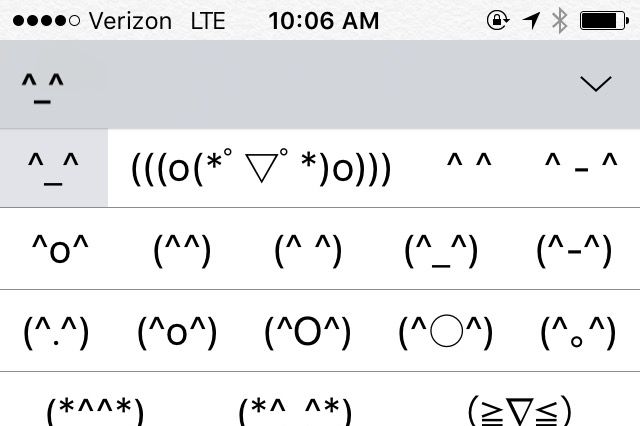
If those emoji aren't enough for you, consider installing the Japanese - Kana keyboard. As its name implies, this is a Japanese keyboard produced by Apple, and it contains dozens of "Kaomojis." These are line drawing emoticons that look simpler and, well, cuter than their English counterparts.
When you're finished selecting Kaomojis, you can easily switch back to your English keyboard by tapping on the globe icon.
To get even more emoji, you'll have to install a third-party keyboard. Popular options include Swiftmoji, Bitmoji, and Touchpal. After installing these apps (and granting them full permissions--they won't work without high-level access to your phone, so keep that in mind when installing), you can enable or disable their keyboards by repeating the process outlined above.
That's it! Enjoy your new emoji-filled life. Just remember: Too many emoji makes us slightly-frowny face.